Cryptomator
cryptomator.org/android
Encrypts files and folders client-side, before uploading them to cloud storage (such as Google Drive, One Drive or Dropbox), meaning none of your personal documents leave your device in plain text.
- Homepage:cryptomator.org/android
- GitHub:github.com/cryptomator/android
- Privacy:cryptomator.org/privacy
- iOS App:apps.apple.com/us/app/cryptomator/id1560822163
- Android App:play.google.com/.../org.cryptomator
- Web info:web-check.xyz/check/cryptomator.org
Cryptomator Privacy Policy
Privacy Policy Summary
- There is a date of the last update of the agreements
- The service claims to be GDPR compliant for European users
- This service tracks which web page referred you to it
- You are not being tracked
- Third parties are involved in operating the service
- Your IP address is collected, which can be used to view your approximate location
- An anonymous payment method is offered
- The data retention period is kept to the minimum necessary for fulfilling its purposes
- Your personal data is used for limited purposes
Score
Documents
- Privacy PolicyCreated 02 Jul 21, Last modified 2 years ago
About the Data
This data is kindly provided by tosdr.org. Read full report at: #4403
Cryptomator Source Code
Author

Description
Cryptomator for Android
Homepage
https://cryptomator.orgRepository
- LicenseGPL-3.0
- Created31 Oct 16
- Primary languageKotlin
- Size14,322 KB
- Stars1,245
- Forks229
- Watchers1,245
Top Contributors
@SailReal (959)
@storm1ng (101)
@tobihagemann (74)
@JaniruTEC (54)
@cryptobot (41)
@Ilithy (9)
@JustFanta01 (8)
@overheadhunter (8)
@WheelyMcBones (6)
@taglioIsCoding (6)
@infeo (3)
@georgi-neykov-hub (3)
@lamtrinhdev (2)
@tonytkachenko (2)
@mrmaffen (1)
@markuskreusch (1)
Recent Commits
Merge pull request #680 from cryptomator/feature/guided-webdav Add guided setup for WebDAV-based cloud services
Merge the 1&1 WebDAV entries into one and drop pCloud WebDAV
Keep the WebDAV setup reachable on small screens and use new credentials right away The WebDAV setup form scrolls, so the Connect button stays reachable in landscape, in split-screen and with large text. When a connection is saved, a cloud that is already in use is accessed with the save credentials and certificate from then on, also when a guided setup takes over an existing WebDAV connection.
Add guided setup for WebDAV-based cloud services
harden ci: don't persist github token Signed-off-by: Armin Schrenk <[email protected]>
use organization's default community health files [ci skip] Co-Authored-By: Claude Opus 5.5 <[email protected]>
New Crowdin updates (#670)
Merge pull request #676 from cryptomator/feature/documents-provider Add documents provider to access vaults from other apps
Allow writes through the documents provider only with write access Like in the app and in the iOS File Provider, creating, writing, renaming, moving and deleting in a vault through Files needs a license, a subscription or a running trial, or a paid Hub license for a Hub vault, which only the unlocked vault knows about. Without it the vault is read-only, and every change is refused even if a client ignores the flags. Asking doesn't record that the trial expired, so the app still shows its dialog, and Files is told when the license changes. A mode without write access, like "rt", is always opened for reading.
Keep folders whose creation failed and follow nodes by id A folder whose creation failed while a file below it waits for upload is kept and created before any change below it. Its leftover in the cloud is taken over or cleaned up, and a name taken in the cloud gets a conflict name. Requests rebuild their cloud path from where the cloud has the folders above them. The provider and the in-app browser follow folders and files by document id when another app renames or moves them. A replaced row doesn't take over the selection, and the selection count stays current. S3 counts folders without a marker as existing.
Fix build -.-
Enhance Fastfile and fix #675
Merge branch 'main' into develop
Merge branch 'release/2.1.0'
Prepare 2.1.0
Update CHANGELOG
Restart auto upload through the vault after re-authentication After tapping "Tap to refresh authentication", the retried auto upload was sent to the cloud's backend instead of the vault and stored the photos unencrypted in the cloud's root folder. Fixes GHSA-5qmj-g47w-hx82
Request local network permission for WebDAV and S3 servers on Android 17 On Android 17 the app needs ACCESS_LOCAL_NETWORK to reach servers in the local network; without it connections timed out after 60 s. Detect that case up front and ask for the permission when adding or editing a connection and when re-authenticating, show a clear message for other failing operations, and no longer crash auto upload on it. Fixes #674
Start the autolock timeout over before the app counts as in the background, so that a check meanwhile doesn't lock the vaults at once The autolock worker also waits in a loop, so that a wakeup without a signal doesn't start a check.
Keep creates, moves and deletes that find their vault locked pending and apply them after the next unlock Reads of a locked vault fail right away instead of waiting behind a pending change, and the documents provider reports them to Files as AuthenticationRequiredException. The image preview waits for the cloud before removing a deleted image's page, names a rejected deletion like the browser does, and keeps its pages consistent when it is recreated after a deletion.
Finish an unlock only after the vault's detected parameters are stored, and lock the vault again if storing fails
Fix moves, deletes and interrupted writes of the documents provider caches - Rename, move, delete and check the existence of a file whose encrypted name is shortened through the contents file in its .c9s folder - Show a move queued behind a running move of the same node at once and start it from its requested path, like iOS, unless the earlier move went astray; persist the running move's target so a restart knows where it went - Wait for a running upload before deleting the file, like iOS, then delete what it uploaded, including a conflict copy it made - Upload what a client wrote through a file descriptor that outlived the process, and keep the copy recorded as open for writing across the restart - Extend Upgrade15To16 with MOVE_TARGET_PATH and LOCAL_MODIFIED_WHEN_OPENED
Keep cache sweeps, exports and lock bookkeeping off the main thread and evict when vaults are removed
Run the autolock timeout on the monotonic clock and compare its deadline in long arithmetic
Apply suggestions from review
Clean up after failed uploads and recognize landed ones by content
Keep saves that overwrite a fresh copy in place A writer's copy that was filled or downloaded just before it is handed out is dated back by a second, so that a write keeping the file's length still changes its modification date. Before, such a save within the same timestamp tick (4 ms on the device) looked unchanged and was dropped, e.g. an in-place overwrite while a reader had the file open.
Harden the documents provider against concurrent writers and failed uploads - Writers get their own copy while a save waits for its upload or a reader has the file open; writers that have it open share it. - A failed writer no longer drops another writer's save that isn't uploaded yet. - Retries recognise the app's own unconfirmed uploads instead of making conflict copies. - Failed uploads are shown in Files ("Pull down to retry"); a vault lock stops uploads instead of failing them, and uploads resume after unlock.
Upload new files once, keep the provider per flavor, name shared files - A file created through the documents provider waits briefly for its first write (and while a writer has it open) before it is created empty, so that copying into a vault uploads it once with its content instead of an empty file first. - Derive the provider authority from the application ID, so that the flavors can be installed side by side. - Put shared URIs into the clip data, so that the share sheet gets the read grant and shows the files' names.
Fix file browser issues found while testing file operations - Ignore removing a row that a newer listing already dropped. A move shows up in the listing at once, before the move reports back, and removing the row again crashed the list. - Show the age of the modified date again on every listing, also for rows that didn't change. - Number a taken name like Android does ("a (1).txt") instead of appending "_", which lost the extension and with it the type.
Cryptomator Security
Security Advisories (2)
- highPatched
GHSA-5qmj-g47w-hx82Auto photo upload stores photos unencrypted in the cloud after re-authentication
- highPatchedCVSS 7.6
CVE-2026-32317Tampered vault configuration allows MITM attack on Hub API
Cryptomator Website
Website
Cryptomator - Free & Open-Source Cloud Storage Encryption
Cryptomator is an open-source encryption tool for secure cloud storage. Protect your privacy for free on Dropbox, Google Drive, OneDrive, and more.
Redirects
Does not redirect
Security Checks
All 65 security checks passed
Server Details
- IP Address104.21.5.32
- LocationSan Francisco,California,United States of America,NA
- ISPCloudFlare Inc.
- ASNAS13335
Associated Countries
 US
 NL
Safety Score
Website marked as safe
100%
Trackers
No known trackers found
Blacklist Check
cryptomator.org was found on 0 blacklists
- AntiSocial Blacklist
- Artists Against 419
- Badbitcoin
- Bambenek Consulting
- CERT Polska
- CoinBlockerLists
- CRDF
- CryptoScamDB
- EtherAddressLookup
- EtherScamDB
- Fake Website Buster
- MetaMask EthPhishing
- NABP Not Recommended Sites
- OpenPhish
- PetScams
- PhishFeed
- PhishFort
- Phishing.Database
- PhishStats
- PhishTank
- Phishunt
- RPiList Not Serious
- Scam.Directory
- SecureReload Phishing List
- Spam404
- StopGunScams
- Suspicious Hosting IP
- ThreatFox
- ThreatLog
- TweetFeed
- URLhaus
- ViriBack C2 Tracker
Website Preview

Cryptomator Android App
Cryptomator iOS App
App Info
 Cryptomator: Protect Privacy
With Cryptomator, the key to your data is in your hands. Cryptomator secures and encrypts your sensitive data in your favorite cloud service. So you can rest assured that only you can access your data. EASY-TO-USE Cryptomator is a simple tool for digital self-defense. It allows you to protect your cloud data by yourself and independently. • Simply create a vault and assign a password • No additional account or configuration needed • Unlock vaults with Face ID / Touch ID • Fully integrated into the Files app COMPATIBLE Cryptomator is compatible with the most commonly used cloud storages and available for all major operating systems. • Compatible with iCloud Drive, Dropbox, Google Drive, OneDrive, SharePoint (incl. Microsoft Teams), pCloud, Box, WebDAV- and S3-based cloud storage services • Create vaults in any location via other File Providers (third-party apps must support this) • Access your vaults on all your mobile devices and computers SECURE You don't have to trust Cryptomator blindly, because it is open source software. For you as a user, this means that everyone can see the code: https://github.com/cryptomator/ios • File content and filename encryption with AES and 256 bit key length • Vault password is secured with scrypt for enhanced brute-force resistance • Crypto implementation is publicly documented AWARD-WINNING Cryptomator received the CeBIT Innovation Award 2016 for Usable Security and Privacy. We're proud to provide security and privacy for hundreds of thousands of Cryptomator users. CRYPTOMATOR COMMUNITY Join the Cryptomator Community and participate in the conversations with other Cryptomator users: https://community.cryptomator.org • Follow us on Mastodon @[email protected] • Like us on Facebook /Cryptomator --- Terms of Use: https://www.apple.com/legal/internet-services/itunes/dev/stdeula/
Rating
Version Info
- Current Version3.1.2
- Last Updated25 Jun 26
- First Released21 Dec 21
- Minimum iOS Version16.0
- Device Models Supported127
App Details
- IPA Size95.44 Mb
- PriceFree (USD)
- Age Advisory4+
- Supported Languages37
- DeveloperSkymatic GmbH
- Bundle IDorg.cryptomator.ios
Screenshots


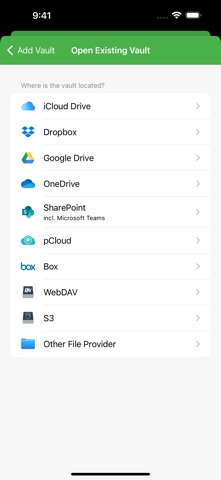


Cryptomator Reviews
More Mobile Apps
Lets you use CloudFlares fast and secure 1.1.1.1 DNS, with DNS over HTTPS, and also has the option to enable CloudFlares WARP+ VPN.
Android Firewall+ (AFWall+) is an advanced iptables editor (GUI) for rooted Android devices, which provides very fine-grained control over which Android apps are allowed to access the network. Get from F-Droid
This application blocks ads and trackers, doesn't require root and works for all the apps on your Android phone. Check out how it works here.
Gives you the ability to grant permissions temporarily, so that you could for example use the camera to take a profile picture, but when you close the given app, those permissions will be revoked.
Prevent background processes gaining unauthorized access to your devices camera. Better still, use a webcam sticker.
Not Open SourceSimple tool, that compares SHA-1 fingerprints of the the SSL certificates seen from your device, and the certificate seen from an external network. If they do not match, this may indicate a man-in-the-middle modifying requests.
Shows which trackers, each of your installed apps is using, so that you can better understand how your data is being collected. Uses data from the Exodus database of scanned APKs.
F-Droid is an installable catalogue of FOSS applications for Android. The client enables you to browse, install, and keep track of updates on your device.
A network scanner to help you monitor and secure your WiFi network. The app is totally free, but to use the advanced controls, you will need a Fing Box.
Auto-disable Bluetooth, then it is not being used. Saves battery, and prevent some security risks. Get from F-Droid
An actively-maintained fork of the Island project with additional enhancements
A sandbox environment, allowing you to clone selected apps and run them in an isolated box, preventing it from accessing your personal data, or device information.
A firewall app for Android, which does not require root. NetGuard provides simple and advanced ways to block access to the internet, where applications and addresses can individually be allowed or denied access to your Wi-Fi and/or mobile connection.
System-wide Tor proxy, which encrypts your connection through multiple nodes. You can also use it alongside Tor Browser to access .onion sites.
An open-source ad-blocker and firewall app for Android 6+ (does not require root).
Prevent background processes taking unauthorized screenshots, which could expose sensitive data.
Not Open SourceTriggers actions, when certain security conditions are met, such as multiple failed login attempts or monitor settings changed. It does require Tasker, and needs to be set up with ADB, device does not need to be rooted.
A radio frequency scanner app for Android with recon and offensive capabilities.
Makes it possible to entirely freeze all background activities on a per-app basis. Intended purpose is to speed up your phone, and prolong battery life, but this app is also a great utility to stop certain apps from collecting data and tracking your actions while running in the background. See on F-Droid
Monitor and control hidden data collection in mobile apps about user behavior/ tracking. Get from F-Droid













About the Data: Cryptomator
Change History
- Amended (androidApp, iosApp)
Edit Cryptomator Data
You can edit Cryptomator's entry in this section of awesome-privacy.yml by submitting a PR to our GitHub repo.
Note that some of the information shown above has been aggregated from external
sources, a list of these can be found data documentation.
Origin Data
Modify Data
API
You can access Cryptomator's data programmatically via our API. Simply make a GET request to:
https://api.awesome-privacy.xyz/v1/services/cryptomatorThe REST API is free, no-auth and CORS-enabled. To learn more, view the API Docs or read the API Usage Guide.
Share Cryptomator
Help your friends compare Mobile Apps, and pick privacy-respecting software and services.
Share Cryptomator and Awesome Privacy with your network!